yaTimer screenshot

PAINLESS TIME TRACKING

  • Track your tasks and projects.
  • Improve your productivity and estimation skills.
  • Print timesheets and other reports.
  • Without changing the way you work.
Download Trial Now   Screenshots
Buy Now yaTimer Single User LicenseOnly $39
Full Year of Free Updates * Install on Up To 3 Computers * Volume Pricing Available
Order risk free with our 30-day money back guarantee.

yaTimer News

14 Jul, 2010 yaTimer 2.6 Now an auto-update 7 Jul, 2010 yaTimer 2.6 Released 16 Jun, 2010 yaTimer Central Pre-Registration Open

Listen to Our Customers

I've been looking for something like the YaTimer for a long time, so I'm glad Google pulled you out on top last week when I was searching.
Mark Ando
www.slipstreamdesign.com
If you are a freelance consultant, writer, or designer, this versatile software timer may be what you have been looking for. It makes keeping track of multitasking activities almost painless.
David St.Lawrence
www.making-ripples.com
More News More Reviews - Tell Us What You Think

yaTimer at a glance

Efficiency

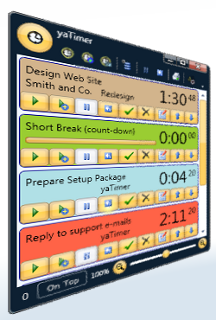
All your tasks, color-coded, in the order you define or arranged in groups by client or project with timing information always visible.

Knowledge

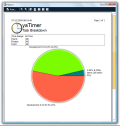
Do you know if one client or project uses an disproportional amount of time? what percent of your time is billable?

Timesheets

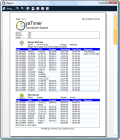
yaTimer can print a wide variety of timesheets you can use to keep track of your time or send to your clients.

Why Use yaTimer

  • The main display is the task list, there you can see all your tasks color-coded, in the order you define or arranged in groups by client or project with timing information always visible.
  • Record both billable and not-billable time – and see what percentage of your time is billable.
  • See how your time is divided between clients and project.
  • You can have several timers running at the same time, when you need to multitask your software should also multitask.
  • yaTimer isn’t just easy to use, it’s also extremely efficient - all major features are just one mouse click away from the main window.
  • You can use countdowns as well as normal timers, countdowns can even play a sound when the time is over – and countdowns are tracked the same as timers so you can use what is more appropriate, you can even switch between timer mode and countdown mode whenever you like.
  • You can create a new task with the timer already running, for those situations where filling the task details are part of the task (like support phone calls).
  • You can save task details as templates and create pre-filled tasks with only two mouse clicks.
  • You can quickly pause all running timers, when you take a break and restart those timers when you return.
  • Zoomable user interface – so you can shrink the display to use less screen space or enlarge it to be clearly visible across the room.
  • yaTimer can print a wide variety of timesheets, including daily and weekly summaries.
  • Reports can be customized with your own header, footer and logo (not available in the trial version).
  • You can save all report as XPS files, or export the data behind the report to CSV files you can load into Excel.
  • yaTimer can run from a portable drive such as a USB thumb drive (not available in the trial version).
  • Full support for Window XP, Windows Vista, Windows Server 2003 and Windows Server 2008 (XP service pack 2 or later, server 2003 service pack 1 or later).
  • You can install yaTimer on up to 3 computers so you can have it running on your work computer, your home computer and your laptop.
  • Risk free – we offer an unconditional 30 days money back guarantee, if you’re not happy with yaTimer we’ll refund your money.
Want to know more?
Download the free trial and see for yourself!
Click Here To Download